
Features & guide
Everything it does.
A complete walkthrough of scoring, settings, history and stats
Golden Point is a standalone Apple Watch app — no iPhone app required. Open the app, tap once to start, then score each point with a single tap. Set the rules to match how you play, and review your form afterwards. Here's how every part works.
01Scoring a match
The scoring screen is split into two large tap targets: Opponent on top (dark) and You on the bottom (in the teal accent). Tap a half to award that side a point — the half brightens and you feel a haptic. A quick same-side tap guard stops a rushed double-tap from counting twice.
The central band shows the current games, a marker for each set won, and the live tiebreak score when you're in a breaker. Pressure moments surface automatically:
- Match point — the band reads "MATCH POINT" when the next point could win it, with its own haptic.
- Golden / Star point — a filled circle or star appears when the next point is sudden death.
- Milestone banners flash for GAME, SET and MATCH, each with a distinct haptic pattern. After a set, a break prompt shows the set winner and running tally.
02Match formats
Pick the format in Settings → Format before (or during) a match:
- Best of 1 — a single set decides the match.
- Best of 3 — first to two sets.
- Short sets — sets to 4 games, with a tiebreak at 4–4.
- Set + breaker — one set, then a match tiebreak as the decider.
- Pro set — first to 9 games, tiebreak at 8–8.
The scoring engine replays your full point log to derive the score, so set and match progress are always consistent — which is what makes undo, redo and crash recovery reliable.
03Deuce & tiebreaks
Tune how tight games and breakers play in Settings. The pickers only appear when they apply to your chosen format:
- Deuce mode — Golden point (sudden death at 40–40), Star point (sudden death only after deuce returns twice), or traditional Advantage.
- Deciding set (Best of 3) — play a full set or a match breaker as the third.
- Set tiebreaker target — 7 or 10 points.
- Match tiebreaker target — 7 or 10 points.
Standard tiebreak logic is enforced throughout: reach the target and win by two.
04Undo & redo
Every point is logged, so any mistake is fully reversible — there are two ways to correct one:
- From the menu — open the match menu (long-press the middle band or swipe left) and use Undo / Redo. Each shows how many points are available.
- With the Digital Crown — rotate the crown with a deliberate flick to undo or redo without opening the menu. Debouncing prevents accidental scrubbing.
05Ending a match
When a winner is decided, the Match complete sheet appears automatically with the result, final score line and duration — tap Save to store it.
To end a game early: open the match menu — long-press the middle band or swipe left on the scoring screen — and choose End session, then Save or Discard. Early-ended matches infer the leading side from sets, then games, then the current game. Saved matches show an end summary with the result, final score, games and sets, plus a contextual insight such as a win streak, your longest match today, or most games this week.
06Match history
Open History from Home or the match menu to see every match you've played:
- Each row shows the result (W / L / Saved), the relative day (Today, Yesterday, weekday or date), the final score and the duration.
- Tap a row to open its full match summary.
- Swipe left on a row to delete that single match.
07Statistics & how they work
Stats are calculated on your watch from your saved matches — open them from Home or the match menu. Sections appear only once there's data for them:
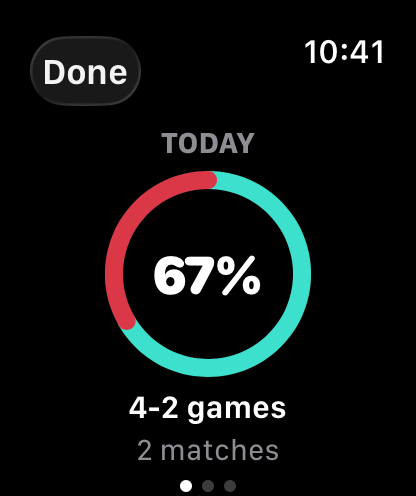
- Today — a ring split into matches won and lost with your match win percentage, your match and game totals, and recent form.
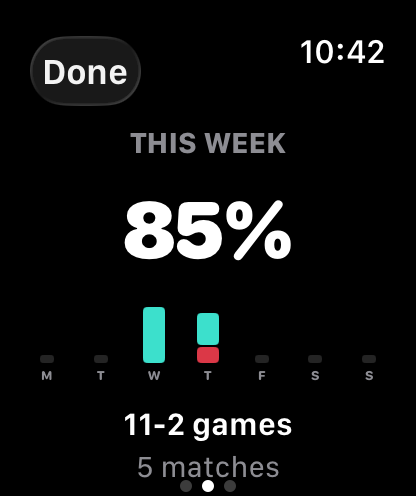
- This week / Last week — your match win percentage, a 7-day bar chart of matches won vs lost per day, plus match and game totals.
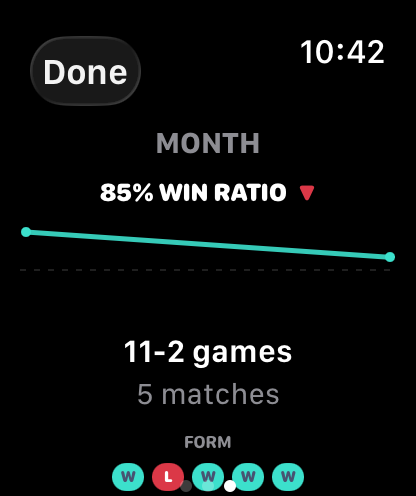
- Trend — a 30-day rolling match win-ratio trend line with an up, down or steady glyph.
- Recent form — your last five match results as W / L / – dots with a short summary.
Win percentage is matches won ÷ decided matches over the period, and games are shown as a separate total. With no history yet you'll see a "No games played" empty state.
08Settings
- Format, Deuce, Deciding set, Set tiebreaker, Match tiebreaker — context-sensitive rule pickers.
- Workout — record the match as an Apple Health workout (see below).
- Haptics — choose Normal or Strong intensity.
- Reset Stats — deletes all saved match history (with confirmation). Your current match and settings are kept.
Rule pickers are locked while a match is active so you can't change the format mid-point by accident — haptics and the workout toggle stay editable, and changing rules between matches updates the next one.
09Apple Health workouts
Golden Point can record each match as an indoor "Padel" workout in Apple Health, which also improves raise-to-wake while you play.
- To enable: turn on the Workout toggle in Settings. The first time, the app asks for Health permission — allow it to save workouts.
- The workout starts and stops with the match and is re-armed automatically if the app restores a match after a restart.
- Prefer not to? Decline Health access and everything else still works fully — you just won't get the workout recording.
10Complication & haptics
- Watch face complication — add the Golden Point complication (accessory circular or corner) to your watch face. Tapping it opens the live match if one's in progress, or Home otherwise.
- Haptics — distinct patterns for point, undo, game, set, match, session end, golden/star point and match point, scaled by your Normal / Strong setting.
- Accessibility — VoiceOver labels throughout, and an Always-On Display mode that dims colours and adjusts contrast when luminance is reduced.
- Crash recovery — the active match is saved after every point, so if your watch restarts mid-match the app puts you right back on the scoring screen.
Ready to play? Download Golden Point on the App Store — or read the FAQ for quick answers.